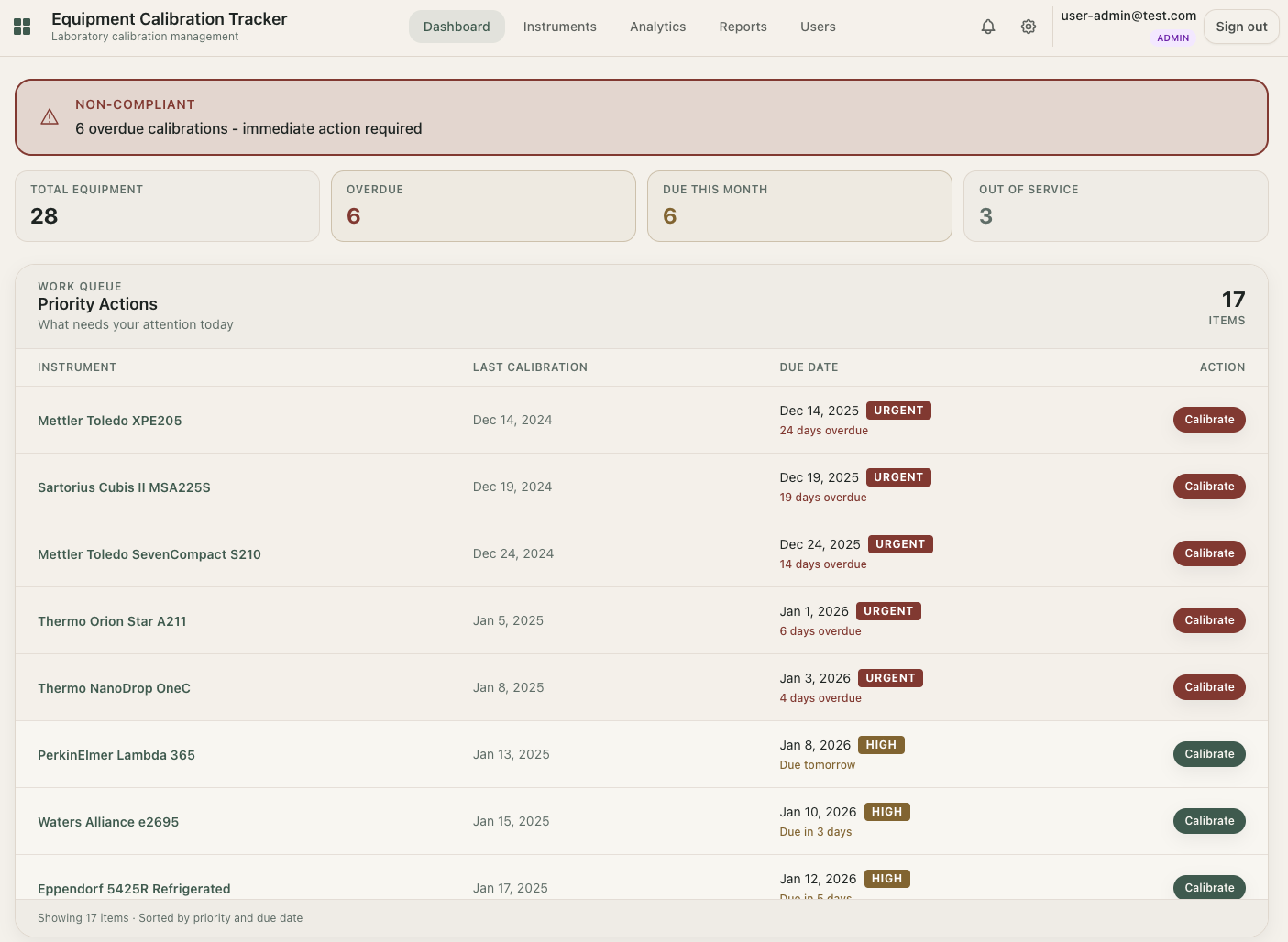
What is calibration management software?
Calibration management software is a specialized digital tool that helps laboratories and manufacturing facilities track measurement equipment, schedule calibration activities, store certificates, and maintain compliance records. It replaces manual tracking methods like spreadsheets, paper binders, and whiteboard calendars.
For small laboratories with 3-30 people managing dozens to hundreds of instruments, this software provides a centralized system to answer the critical question: Which equipment is due for calibration, and when?
Unlike enterprise LIMS (Laboratory Information Management Systems) designed for large pharmaceutical companies, calibration management software for small labs focuses on simplicity: track instruments, get reminders, generate reports. No complex validation processes, no six-figure implementation costs.
Core capabilities include:
Why small laboratories need calibration tracking
If you're reading this, you probably manage calibration using one of these methods:
- Spreadsheets - One or more Excel files with instrument lists and calibration dates
- Paper binders - Physical folders with certificates and handwritten logs
- Calendar reminders - Manual entries in Outlook or Google Calendar
- Memory - Hoping someone remembers when equipment is due
These methods work. Until they don't.
The hidden costs of manual tracking
Small labs often underestimate the time and risk associated with manual calibration tracking:
- Missed calibrations - Without automated reminders, equipment can go months past due before anyone notices
- Audit failures - Scrambling to find certificates and organize records when auditors arrive
- Version confusion - Multiple spreadsheet versions floating around, nobody sure which is current
- Data loss - Critical calibration history lost when someone accidentally overwrites a file
- Time waste - Hours spent manually updating dates, sending reminder emails, searching for certificates
"We missed a critical calibration by three weeks. The auditor found it before we did. That's when we knew we needed proper software." - Quality Manager, Environmental Testing Lab (30 instruments)
For labs with 20+ instruments, the time savings alone typically justify the cost of calibration software within the first few months.
Key features to look for in calibration management software
Not all calibration software is designed for small laboratories. Enterprise solutions include features you'll never use and complexity you don't need. Here's what actually matters for labs with 3-30 people:
1. Automated calibration reminders
The most valuable feature. Good software sends email notifications at configurable intervals before calibration is due (30, 14, 7 days). The best systems also show dashboard alerts for overdue items and equipment approaching due dates.
2. Complete calibration history
Every calibration event should be recorded with: date performed, result (pass/fail), next due date, provider (internal or external lab), certificate reference, and any notes. This history should be viewable on a single timeline per instrument.
3. Certificate and document storage
Attach calibration certificates (PDF), photos, and other documents directly to calibration records. No more hunting through email folders or shared drives.
4. Compliance reporting
Export reports for audits: instrument lists, calibration status, overdue items, full calibration history. CSV and PDF export capabilities are essential.
5. Multi-user access with permissions
Different team members need different access levels. Administrators configure the system, managers approve records, technicians enter data, and read-only users (like auditors) can view without modifying.
6. Failed calibration handling
When calibration fails, the software should flag the instrument, trigger notifications, and allow you to record corrective actions. This audit trail is critical for compliance.
Features you probably don't need (yet)
- Automated calibration procedure execution
- Integration with calibration hardware
- Multi-site management with complex hierarchies
- 21 CFR Part 11 electronic signatures
- Custom workflow builders
These features add cost and complexity. Consider them only if your specific requirements demand them.
Calibration reminder software: why alerts matter
For most small labs, reminder automation is the highest-impact feature because it prevents missed due dates without adding manual admin work. A good reminder system sends alerts before due dates, flags overdue instruments on your dashboard, and keeps everyone aligned on what needs action this week.
At minimum, your reminder setup should support:
- Multiple lead times (for example: 30, 14, and 7 days)
- Overdue escalation notifications
- Role-based recipients (technician, quality manager, admin)
- A clear audit trail showing when reminders were sent
If you are still setting your cycle rules, use our free calibration interval recommender to estimate practical calibration interval guidelines and next due dates by instrument type and risk level.
Ready to simplify calibration tracking?
LabCalibrate.com is built specifically for small laboratories and is currently free to use. No credit card, checkout, or subscription setup required.
Create Free AccountExcel vs. dedicated software: when to make the switch
Many labs start with Excel. It's familiar, flexible, and free. But at a certain point, spreadsheets become a liability rather than an asset.
Excel works well for:
- Fewer than 20 instruments
- Single user managing all calibration data
- No external audits requiring formal records
- Calibration intervals that rarely change
Switch to dedicated software when:
- You have 20+ instruments to track
- Multiple people need access to calibration records
- You're preparing for ISO 9001, ISO 17025, or customer audits
- You've missed calibrations due to forgotten reminders
- You spend more than 2 hours per month maintaining spreadsheets
- You need to produce calibration reports on short notice
Real comparison: time spent
| Task | Excel | Software |
|---|---|---|
| Check due dates | 15-30 min/week | 2 min (dashboard) |
| Send reminders | 30-60 min/month | Automatic |
| Record calibration | 5-10 min | 2-3 min |
| Find certificate | 5-15 min | 30 seconds |
| Generate audit report | 1-2 hours | 5 minutes |
For a lab with 50 instruments and 2 people managing calibration, dedicated software typically saves 4-6 hours per month while reducing error risk significantly.
Free and paid calibration management software comparison (2026)
Calibration software pricing varies widely based on features, instrument limits, and user counts. LabCalibrate is currently positioned as a free option for small labs, while many established tools use trials, limited free tiers, or paid monthly plans.
| Product | Starting Price | Free Plan | Best For |
|---|---|---|---|
| LabCalibrate.com | Free | Yes | Small labs (3-30 people) |
| GageList | Free tier available | Yes (limited) | Budget-conscious labs |
| GAGEtrak | $79/month (node-locked) | Trial only | Established quality teams |
| SafetyCulture | $24/user/month | Yes (10 users) | Multi-purpose inspection |
| IndySoft | $199/user/month | Trial only | Highly regulated industries |
| Beamex CMX | Custom quote | No | Process industries |
| Fluke MET/CAL | Custom quote | No | Calibration laboratories |
What pricing usually reflects
- Instrument limits - More instruments often means a higher price
- User seats - Some charge per user, others include unlimited
- Support level - Priority support often costs extra
- Advanced features - Custom reports, API access, integrations
- Hosting - Cloud vs. on-premises (on-prem usually costs more)
For small laboratories, many paid tools still land around $59-$200/month. If you choose a free option, check whether it includes the operational basics: reminders, calibration history, certificate attachments, exports, and team access.
Compliance and audit preparation
Calibration management software helps laboratories meet requirements from several standards:
ISO 9001:2015 requirements
Clause 7.1.5.2 (Measurement Traceability) requires organizations to:
- Calibrate equipment at specified intervals or before use
- Calibrate against measurement standards traceable to international or national standards
- Uniquely identify monitoring and measurement equipment
- Maintain records of calibration
- Assess previous results if equipment is found nonconforming
Good calibration software provides objective evidence for all these requirements through organized records, calibration history, and status tracking.
ISO/IEC 17025 for calibration laboratories
Accredited calibration labs have more stringent requirements around measurement uncertainty, method validation, and traceability. While any calibration software can store records, 17025-accredited labs should verify the software supports their specific documentation requirements.
Industry-specific standards
- AS9100 - Aerospace quality management
- IATF 16949 - Automotive quality management
- ISO 13485 - Medical devices
- API Spec Q1/Q2 - Oil and gas industry
These standards build on ISO 9001 requirements. Most calibration management software supports these through flexible configuration.
Preparing for audits with software
When auditors ask to see your calibration program, you should be able to produce in minutes:
- Complete instrument list with current status
- List of overdue items (if any) with justification
- Sample calibration records with certificates attached
- Evidence of reminder system (email logs or dashboard screenshots)
- Procedure for handling failed calibrations
GDPR compliance and EU data hosting
If your laboratory operates in the European Union or handles data of EU residents, GDPR compliance matters. Many calibration software vendors are US-based and store data on US servers, which creates compliance complexity.
What to look for in a GDPR-compliant vendor:
- EU data hosting - Data stored on servers within the EU/EEA
- Data processing agreement (DPA) - Clear contractual terms for data handling
- Data export capabilities - Ability to export your data on request
- Data deletion - Clear process for deleting data when you terminate
- Security measures - Encryption, access controls, audit logging
Why EU hosting matters
Data transfers from the EU to countries without adequate data protection (like the US, post-Schrems II) require additional legal mechanisms. Using a vendor with EU-hosted infrastructure simplifies compliance significantly.
LabCalibrate.com stores all customer data on EU-based servers (Poland) with full GDPR compliance, clear data processing agreements, and straightforward data export/deletion processes.
How to choose the right calibration management software
With multiple options available, here's a framework for making the right decision:
Step 1: Assess your current situation
- How many instruments do you track?
- How many people need access?
- What's your current method (spreadsheets, paper, nothing)?
- What compliance standards apply to your lab?
Step 2: Define must-have features
For most small labs, these are non-negotiable:
- Email reminders (configurable timing)
- Certificate storage
- Calibration history timeline
- Export reports (CSV/PDF)
- Multi-user access
Step 3: Evaluate cost and limits
- Does the free or paid plan match your instrument count and user needs?
- Are there hidden costs for implementation, training, migration, or support?
- What happens when you grow - do limits or costs scale reasonably?
Step 4: Test before committing
- Create a free account or use a trial account
- Add 5-10 real instruments
- Record a calibration with certificate attachment
- Generate a sample report
- Have another team member try the interface
Step 5: Check support and onboarding
- Is there documentation and help content?
- How responsive is customer support?
- Do they offer data migration assistance?
Questions to ask vendors
- Where is my data hosted?
- How long does implementation typically take?
- Can I export all my data if I decide to leave?
- What happens if I exceed any instrument or user limits?
- Is there a contract, subscription, or payment requirement?
Implementation timeline: what to expect
One advantage of modern cloud-based calibration software is fast implementation. Unlike enterprise systems that take months, small labs can be operational quickly:
Day 1: Account setup
- Create account and configure lab details
- Set up user accounts and permissions
- Configure reminder settings (email timing, notification preferences)
Days 2-7: Data entry
- Import or manually add instrument list
- Enter current calibration status and due dates
- Upload existing certificates (optional but recommended)
Days 7-14: Team onboarding
- Train team members on basic operations
- Establish workflows for recording calibrations
- Test reminder system with upcoming calibrations
Day 14+: Routine operation
- System runs in background with automated reminders
- Team records calibrations as they occur
- Reports available on demand for audits
Data migration options
If you have existing data in spreadsheets, some vendors (including LabCalibrate.com) offer free migration assistance. They'll import your instrument list, calibration history, and link certificates. This can save hours of manual data entry.
Evidence and standards references
If you need to justify tooling decisions to auditors or leadership, start with standards clauses and measurable workload. Example scenario (illustrative): a lab with 120 active instruments and annual calibration cycles handles at least 120 due-date decisions per year. At six controlled fields per completed event (ID, date, provider, result, uncertainty note, next due date), that is about 720 controlled data fields annually before attachments and corrective actions.
- ISO 9001 quality management - see measurement resource and traceability requirements (including clause 7.1.5 context).
- ISO/IEC 17025 overview - supports risk-based interval control and conformity statements.
- ILAC documents - practical accreditation guidance used by testing and calibration laboratories.
- GDPR legal text (EU 2016/679) - authoritative source for EU data protection obligations.
Frequently asked questions
What is calibration management software?
Calibration management software is a digital tool that helps laboratories track measurement equipment, schedule calibration reminders, store certificates, and maintain compliance records. It replaces manual tracking methods like spreadsheets and paper binders.
How much does calibration management software cost?
Calibration management software typically costs between $59-$500+ per month depending on the number of instruments and users. Entry-level plans for small labs (50 instruments, 5 users) start around $59/month. Enterprise solutions with advanced features can cost significantly more.
Do I need calibration management software for ISO 9001 compliance?
ISO 9001:2015 Clause 7.1.5.2 requires organizations to maintain measurement traceability records. While software is not mandatory, it significantly simplifies compliance by providing audit trails, automated reminders, and organized certificate storage that spreadsheets cannot easily replicate.
Can I use Excel for calibration tracking?
Excel can work for very small instrument lists (under 20 items), but becomes problematic as you grow. Common issues include: no automatic reminders, difficulty tracking history, version control problems, and manual data entry errors. Dedicated software becomes valuable once you exceed 20-30 instruments.
Is my data GDPR compliant with cloud-based calibration software?
GDPR compliance depends on where your data is stored and how the vendor handles it. Look for vendors that host data in the EU, provide clear data processing agreements, and offer data export capabilities. LabCalibrate.com stores all data on EU-based servers with full GDPR compliance.
How long does it take to implement calibration software?
Cloud-based calibration software for small labs can be implemented in 1-2 weeks. Day 1 is account setup, days 2-7 are data entry, and days 7-14 are team onboarding. Some vendors offer free data migration from spreadsheets, which accelerates the process.
What's the difference between calibration software and LIMS?
LIMS (Laboratory Information Management Systems) are comprehensive platforms for managing all lab operations including samples, tests, and results. They're designed for large organizations and cost significantly more. Calibration software focuses specifically on equipment tracking and is simpler, faster to implement, and more affordable for small labs.
Stop missing calibrations. Create your free account today.
LabCalibrate.com is calibration management software built for small laboratories. It is currently free to use, with no credit card or checkout step required. Set up in under 5 minutes.
Create Free Account